This is a practical breakdown of how high-performing B2B cleantech paid media programs actually get built, beyond the theory and into the real decisions behind the work.
You'll find:
1. How to avoid the targeting tax
Why up to 44% of your budget is reaching people who can't buy, and the top five platform defaults responsible for it.
2. How the stack gets connected
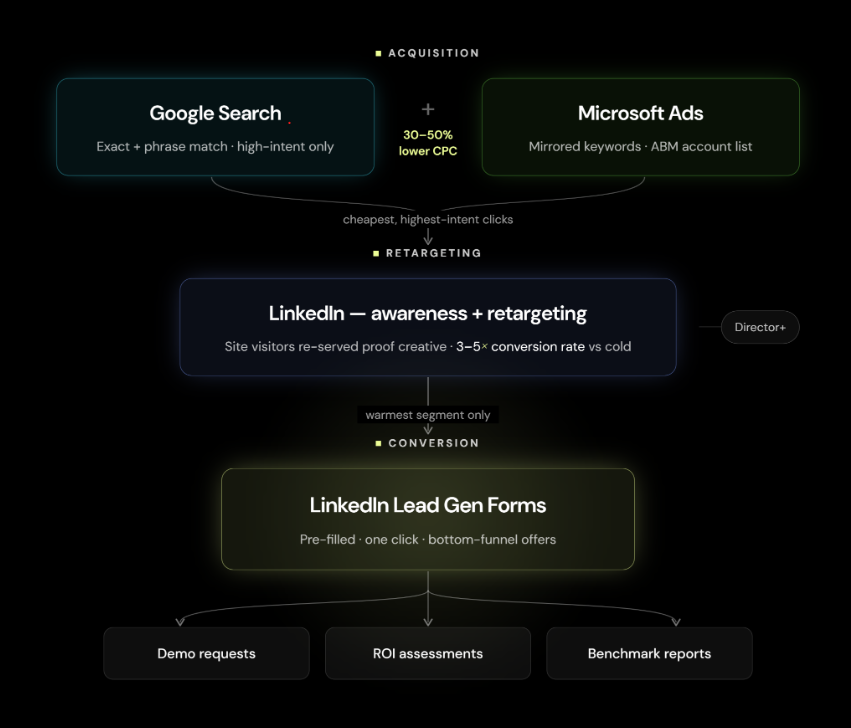
How Google Search, Microsoft Ads, and LinkedIn work in sequence, each channel feeding the next.
3. Decisions top performers make behind the scenes
Landing page matching, day parting, demographic exclusions (a.k.a the optimisations that move CAC without touching the budget).
4. Building reinforcement learning into your program
Why institutional memory separates a growth program from a series of disconnected experiments.
5. How to collect data you can bring to the board
90 days of clean data, one answer to every hard question about your paid motion.
Every "from the lab" section that you'll find pulls real numbers from real client accounts - so you can see exactly what these decisions look like in practice.
If you're running B2B cleantech paid media and the pipeline conversation keeps having the same problem every quarter, start here.
The opponent every marketer is up against
You've done everything right, spend is going out, impressions are ticking up, and the click through rate is holding. By every rule you were given, you're winning.
So why are you walking into the same pipeline meeting, having the same conversation, for the third quarter running?
The problem was never you. The channels you're running were never built for your buyer. They're built to reach as many people as possible, and their defaults keep doing exactly that, every day you leave them untouched.
Look at who your budget actually reaches. The accounts seeing your ads most often are the ones least likely to ever sign a contract. Coordinators and analysts pulling background for a report.
They engage, they click, they keep the numbers looking healthy, and the platforms keep serving them because that's exactly who they were built to find.
We call this the targeting tax.
On a $15K monthly budget, it typically runs at 44%. That's $6,600 a month funding impressions on people who don't control the budget, can't initiate procurement, and won't reply to your SDR.
You didn't build that system, but there’s a way to beat it.
The five settings that are collecting your targeting tax right now.
They're on every account that hasn't been audited. Each one is a small structural decision that the platform made for you, in the platform's interest.
1) LinkedIn's audience expansion is “on” by default
It takes your named account list and quietly extends it to profiles the algorithm decides are close enough. Same engagement patterns, same demographics, but completely different purchase authority.
A sustainability coordinator at a Fortune 500 clicks your ad at $12 a click. She's a real person at a real target account, but she doesn't control the procurement decision and won't for years.
The platform counts it as a win, and you paid for it anyway.

The fix takes thirty seconds. Turn expansion off, every campaign, every time. The audience gets smaller, and every dollar starts reaching people who can actually say yes.
2) Google's brand campaigns run the same trap at lower cost
The person searching your company name was already coming. They'd found you through a referral, a LinkedIn post, an event.
Instead, you’re now paying $4 to $8 per click for traffic that was heading to your organic listing anyway. The conversion rate looks strong because the intent was already there. The spend was redundant.
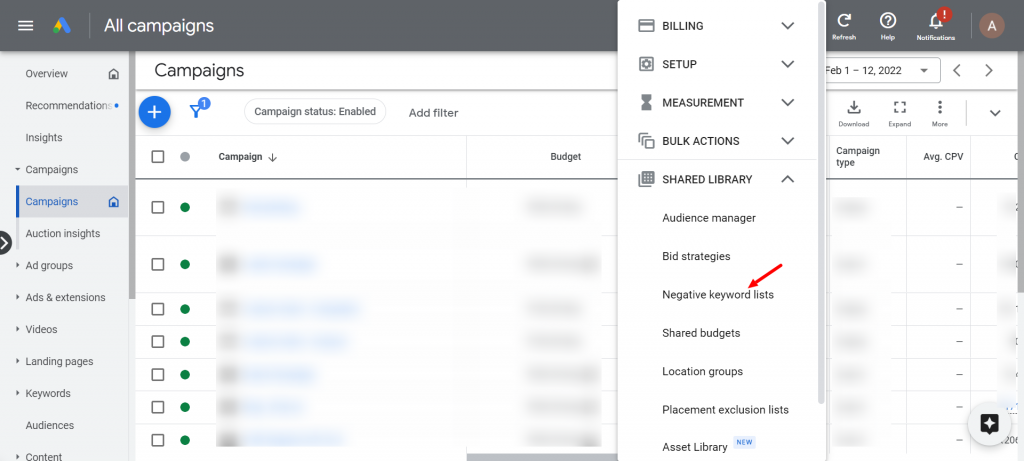
Add your brand terms to the negative keyword list across every non-brand campaign. Let organic do the job it's already doing.
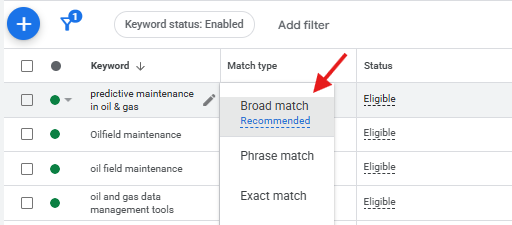
3) Broad match on low intent terms is the subtler version of the same problem
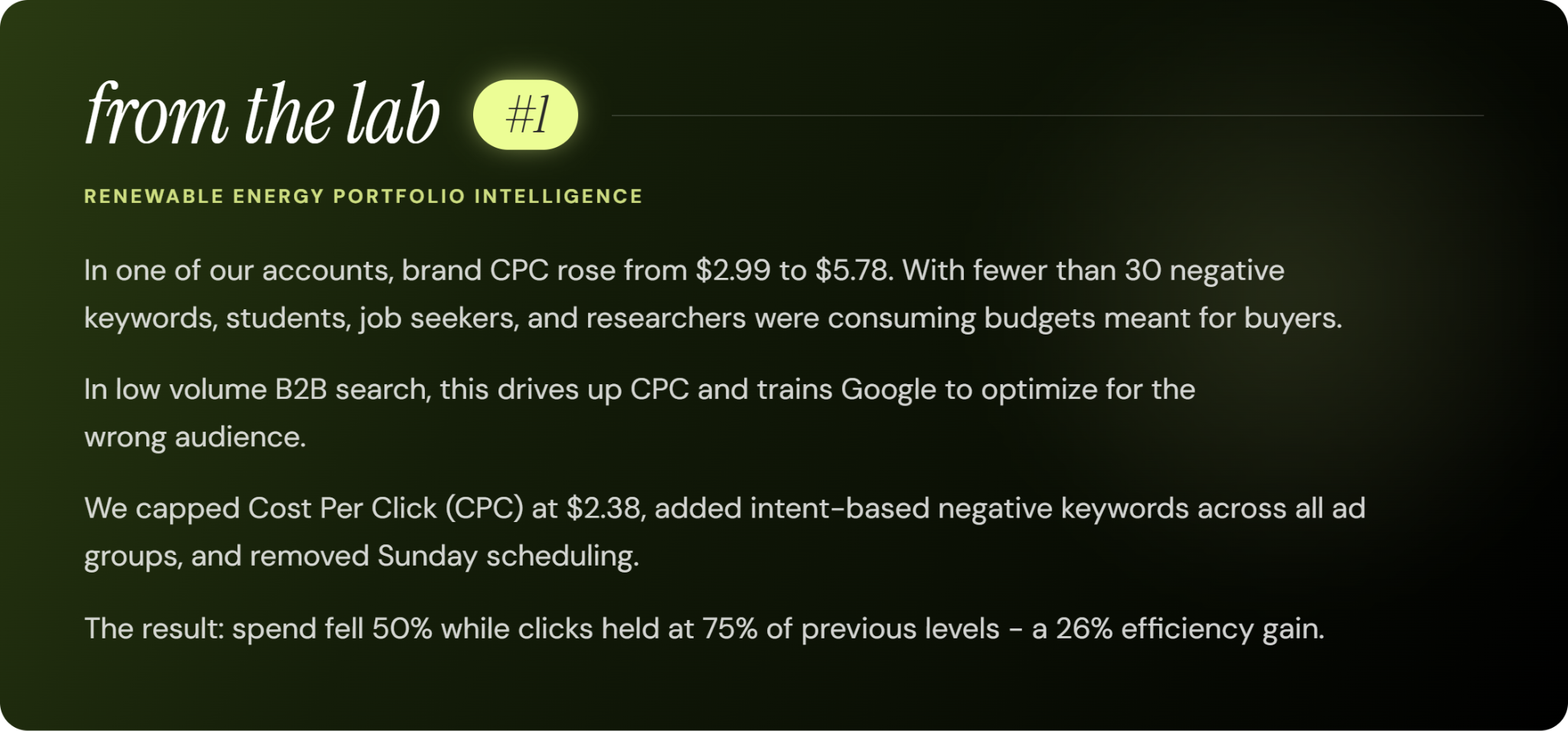
The gap between someone typing "what is carbon accounting" and someone typing "carbon accounting software for enterprise procurement" is the gap between a student writing a paper and a buyer sizing up vendors.
Broad matches pull in both and can't tell them apart.
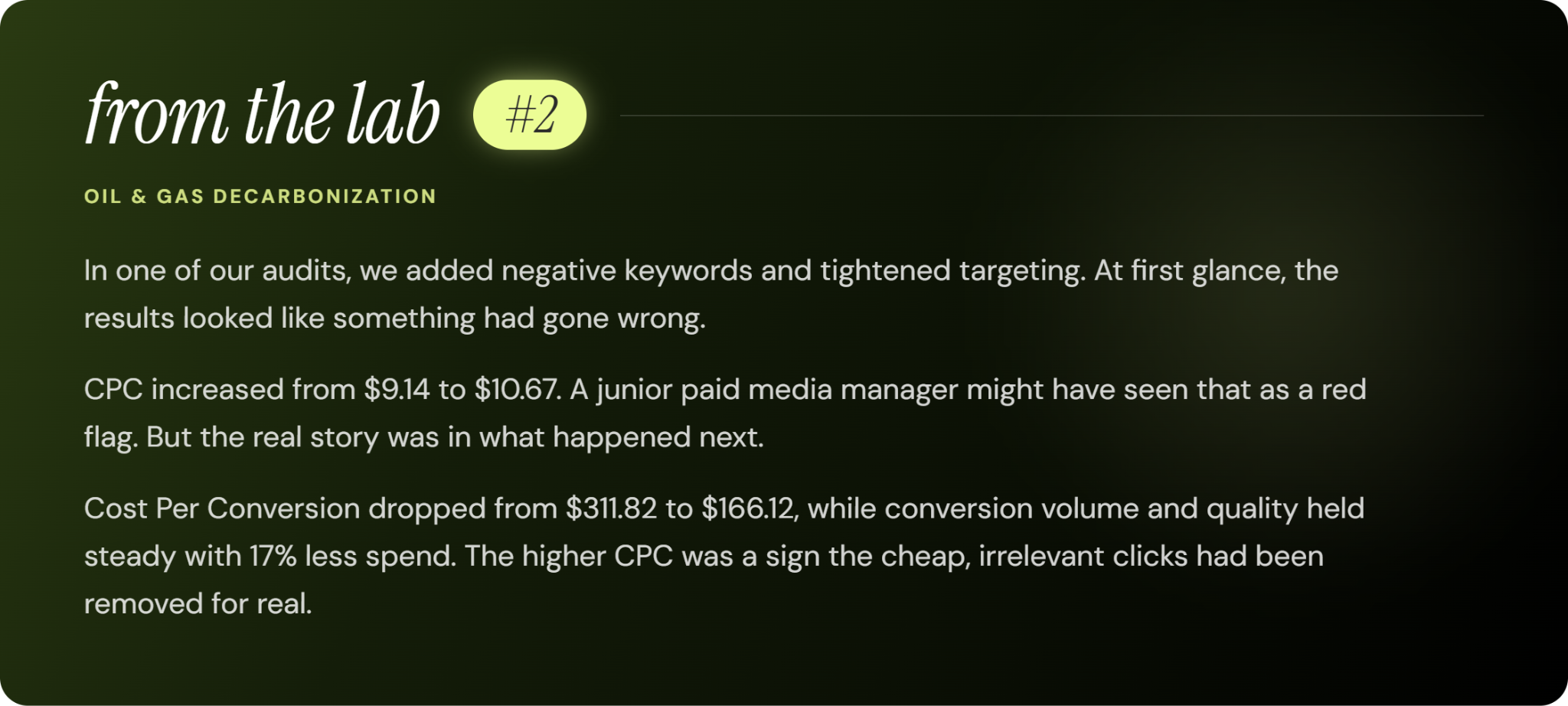
We’ve seen several accounts running broad matches without a disciplined negative keyword list. There is always a similar pattern: healthy impression volume, and cost per click, but low conversion. This means that while top of funnel metrics looks good, anything close to sales and revenue breaks down. poor SQL rate, and a cost-per-click that looks efficient until you trace it to the pipeline.
4) Seniority leakage on LinkedIn produces the same result at a smaller scale than audience expansion.
Targeting a job function without a Director and above seniority filter means the majority of impressions serve to analysts, associates, and coordinators.
These people may influence a deal over eighteen months. They rarely initiate one.
When it takes three to five people on a committee to move a deal, paying to reach the other two hundred in the department is just spreading your budget thin across people who were never going to sign.
The fix is one filter. Add a seniority layer - Director and above to every job function you're targeting. The audience gets smaller. The people in it get more expensive to reach. That's the trade you want.
5) Titles that look right but aren't are the hardest default to catch because it requires knowing your ICP precisely enough to spot the near miss.
LinkedIn targeting by job title pulls in everyone who holds that title, and plenty of titles sit close enough to your buyer that the platform can't tell the difference.
You can, because you know what your buyer actually does all day.
If you haven't mapped that difference clearly, the campaign finds the adjacent person every single time.
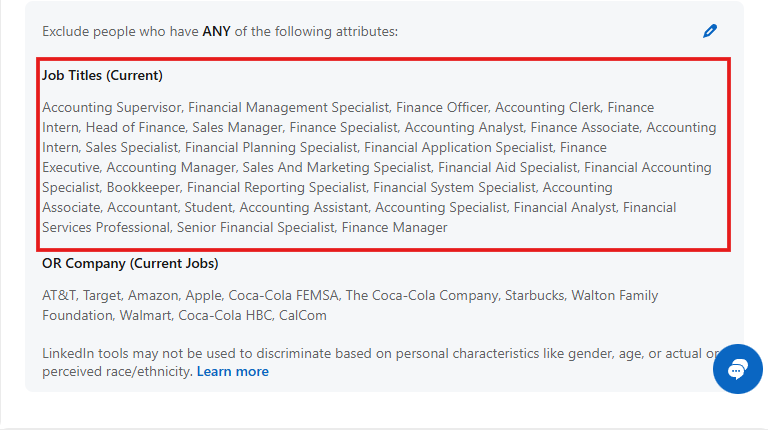
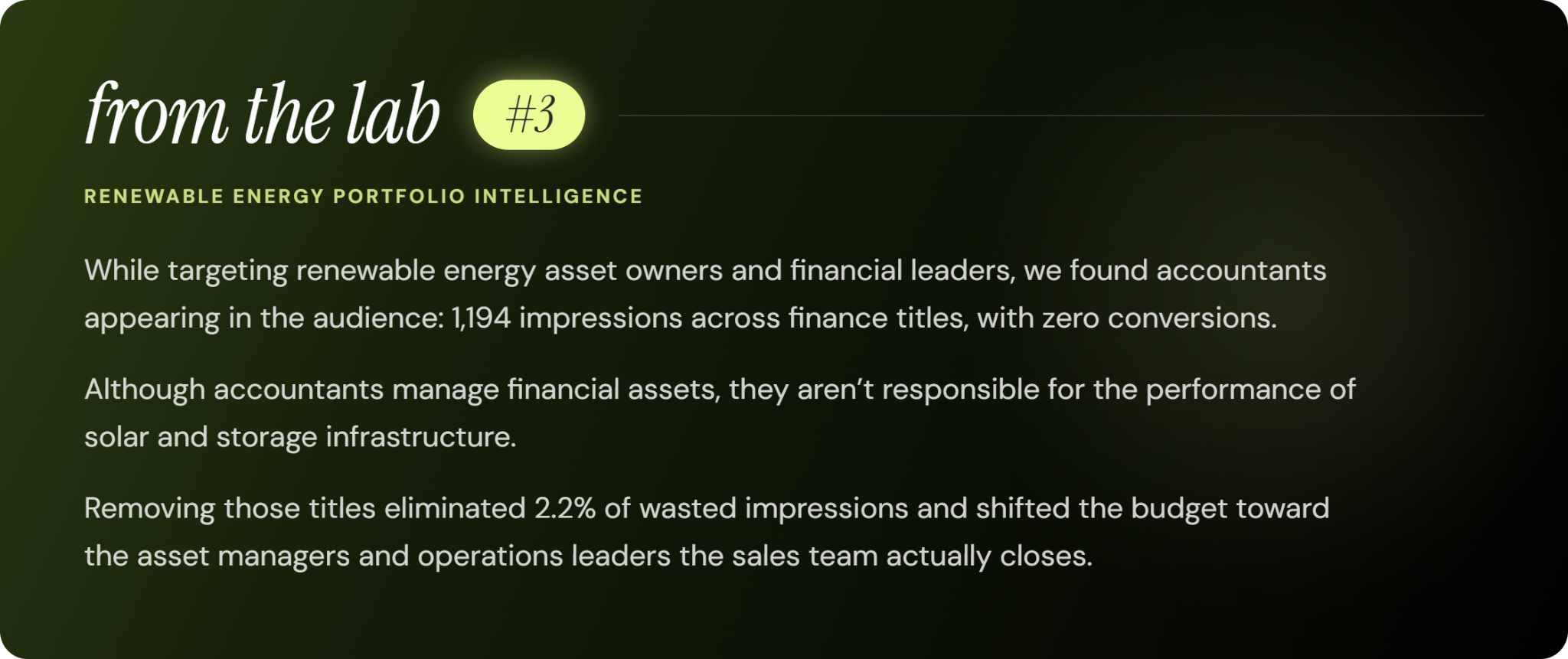
The fix: build a short exclusion list of titles that look like your buyer but aren't. Same function, different accountability. In cleantech, that gap shows up often - the person responsible for evaluating a solution and the person responsible for operating it can share a job family but sit on completely different sides of the procurement decision. Map the buying motion first, then build the title targeting around it.
Fix these five defaults and the budget structure changes before you have touched a single bid or reallocated a single dollar. What remains is a smaller, more accurate audience and the foundation for a stack that actually compounds.
The stack: Google captures it, Microsoft qualifies it, LinkedIn closes the gap
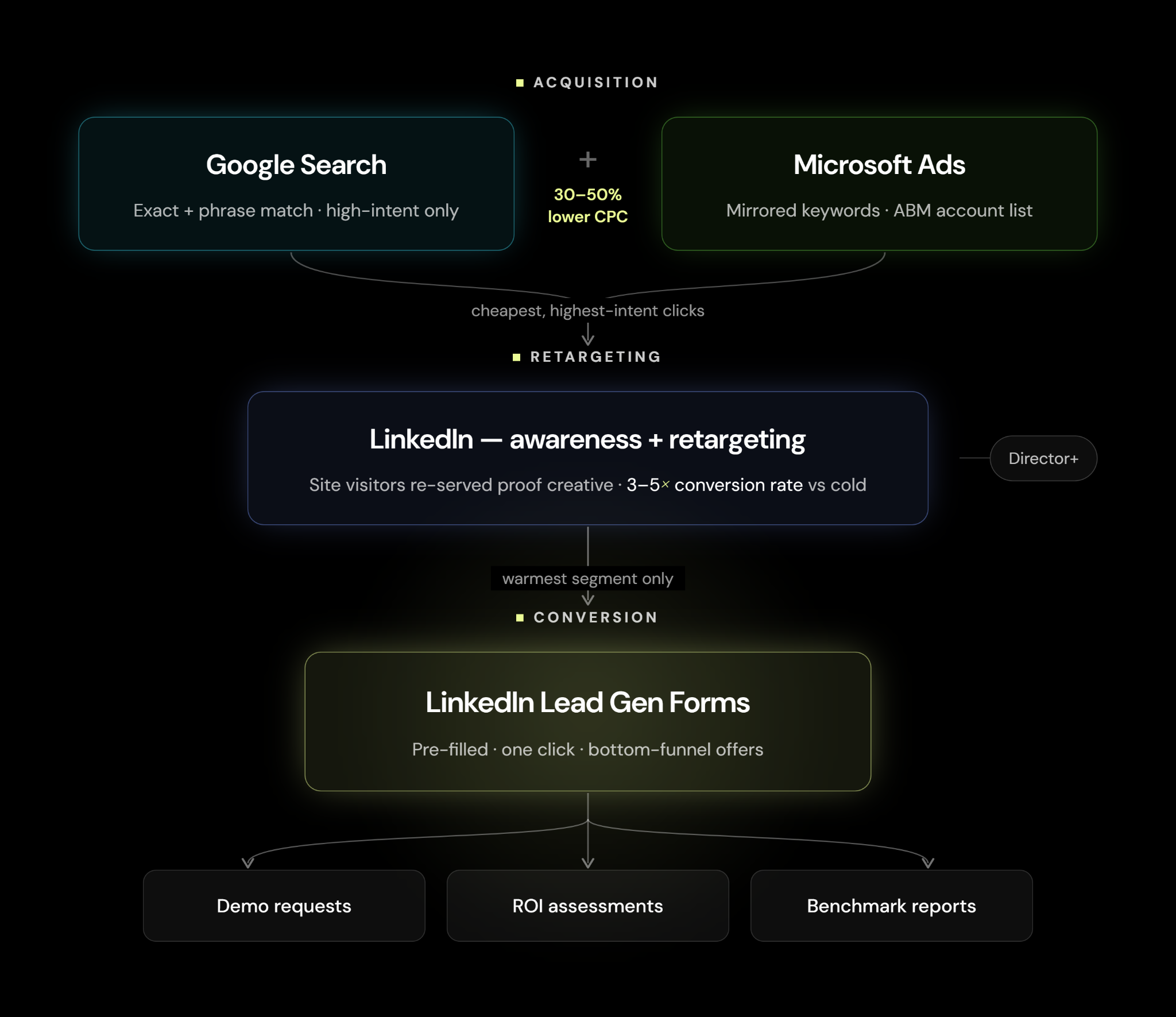
The value of this stack lies in its sequencing. Each channel plays a distinct role in the buyer journey, creating momentum that improves the performance of the next channel and compounds results over time.
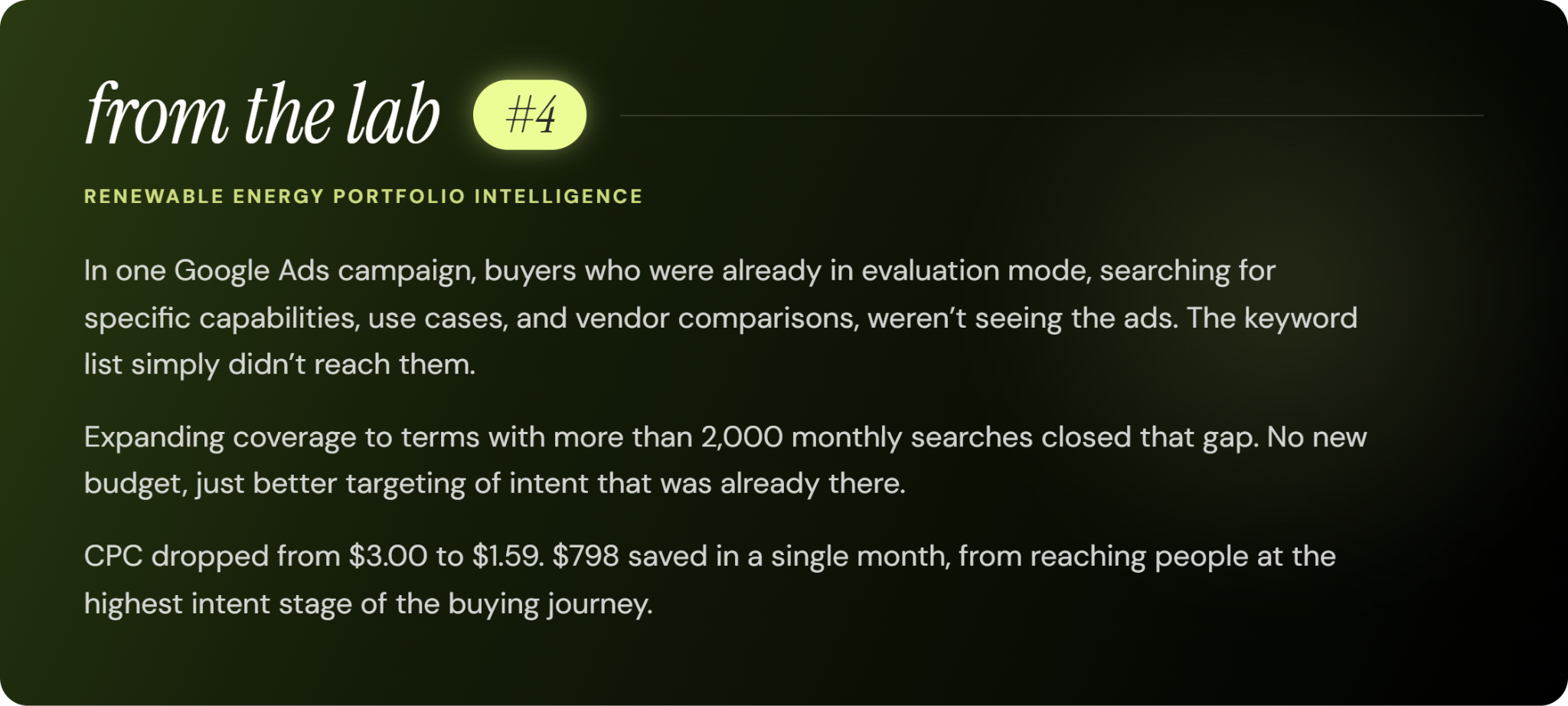
Google Search is where active demand shows itself. Someone searching "energy management platform for utilities" or "grid-scale storage software pricing" has already named their problem and started shortlisting vendors.
You show up at that moment, with exact and phrase match on solution-aware terms only, the ones that signal a buyer already evaluating.
Account structure follows the same logic. Separate campaigns per intent cluster, management, monitoring, ROI, pricing, each with ad copy written to match what that group is actually searching for.
Negative keywords run across every campaign, reviewed weekly against the search term reports. Keep bids manual for the first few months, set to what you can afford per click given your target CAC, not what the platform suggests. Those recommendations serve Google's auction before they serve your pipeline.
Microsoft
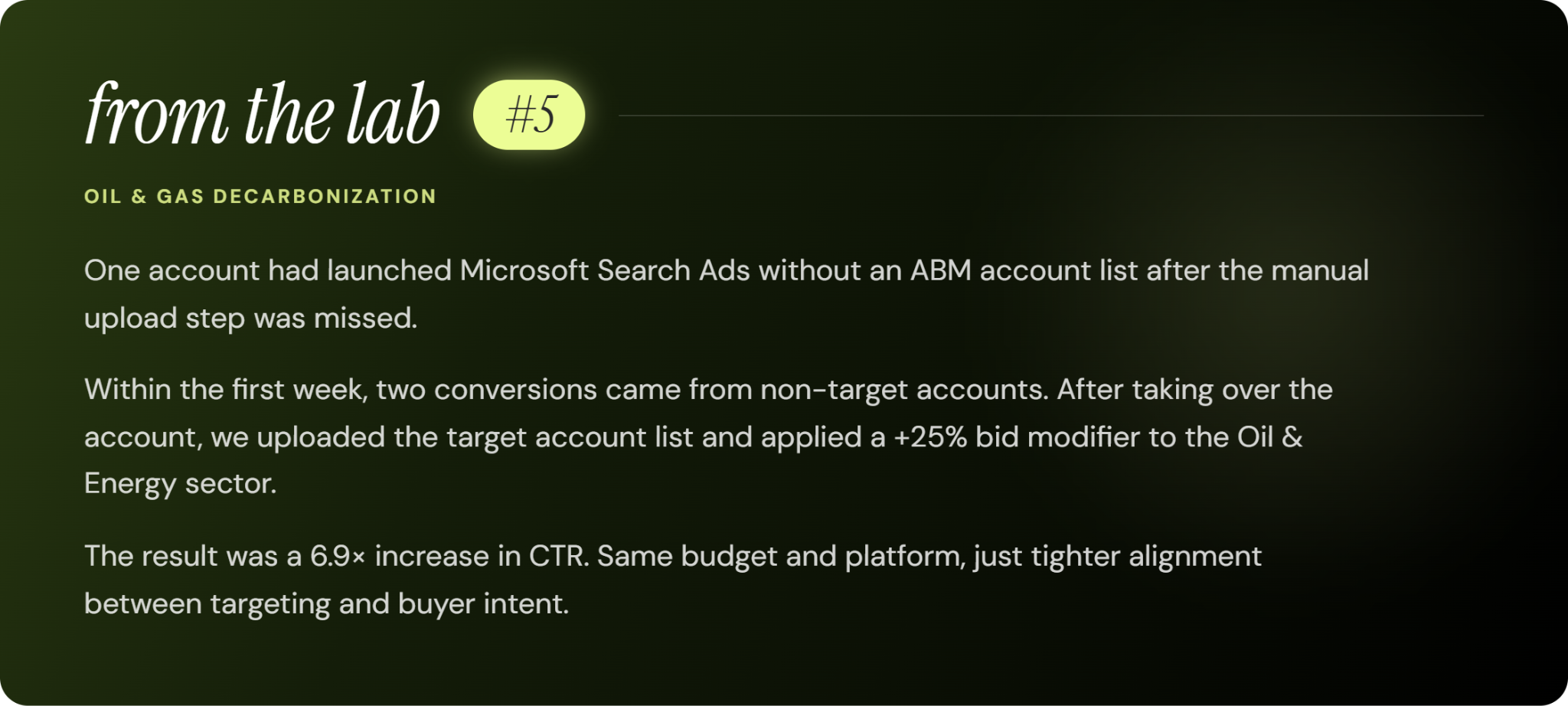
Microsoft Ads runs the same keyword strategy as Google, plus one structural move that changes the math.
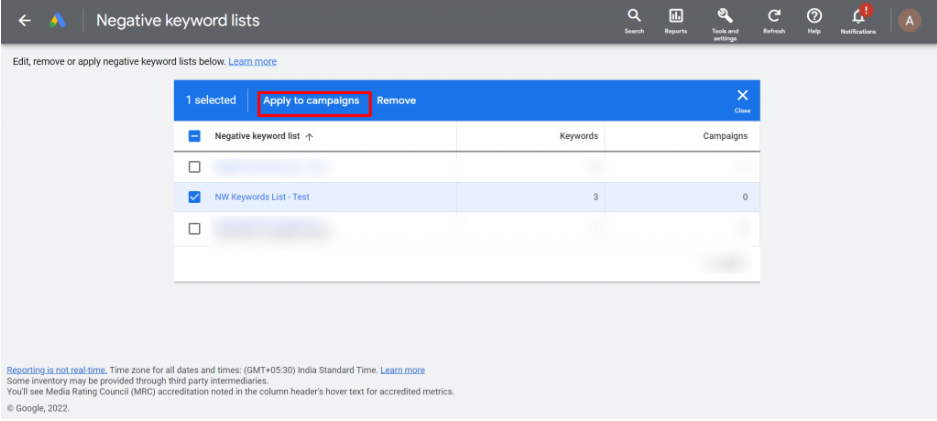
You upload your target company list, and from then on your ads reach those accounts and no one else. The person searching is just as ready to buy as they'd be on Google, but each click costs 30 to 50% less in most business-to-business markets, and every one of those clicks comes from a company on your list.
Build the keyword list as a mirror of Google's. Before you launch, upload your list of target companies and match them using their LinkedIn page addresses, which gives you the most accurate results.
Once that list is running, you can put a bit more of your budget behind the industries where most of your buyers already are.
The final channel runs three motions, layered from cold to hot.
The first is a light awareness layer, shown at low frequency to the right people at your target accounts (Director level and up) in the job functions that sit on your buying committee.
Three to five impressions before your SDR reaches out, so the first message lands on a name that already looks familiar. The recognition is what gives the SDR a warm opening instead of a cold one.
The second is retargeting. Anyone who came through Google or Microsoft and spent time on your site drops into a LinkedIn retargeting audience.
Now the creative changes, from introducing you to proving you, case studies, ROI numbers, specific outcomes. These audiences convert at three to five times the rate of cold ABM lists, and at a fraction of the cost, because search already told you the intent was there.
The third is Lead Gen Forms, the hot layer. These go to the warmest slice of your retargeting audience, the people who have seen your brand, visited your site from search, and clicked on your retargeting creative.
Lead Gen Forms cut the landing page out completely. The form fills itself in from the person's LinkedIn profile, and they submit in one click. Conversions run far higher than a normal click-through campaign, because there's almost nothing standing between wanting the thing and getting it.
Save these for your highest-value offers, demo requests, ROI assessments, benchmark reports. The audience is small, but the conversion rate earns back the higher cost.
Here's why the sequence feeds itself. Google and Microsoft buy the cheapest, highest-intent clicks. Then LinkedIn takes those same visitors and works them inside a decision-maker audience.
The most expensive channel only fires on people who already qualified themselves through the cheaper ones. That means every dollar you spend on search makes every dollar on LinkedIn work harder.
The decisions that don't make the deck but do move the CAC
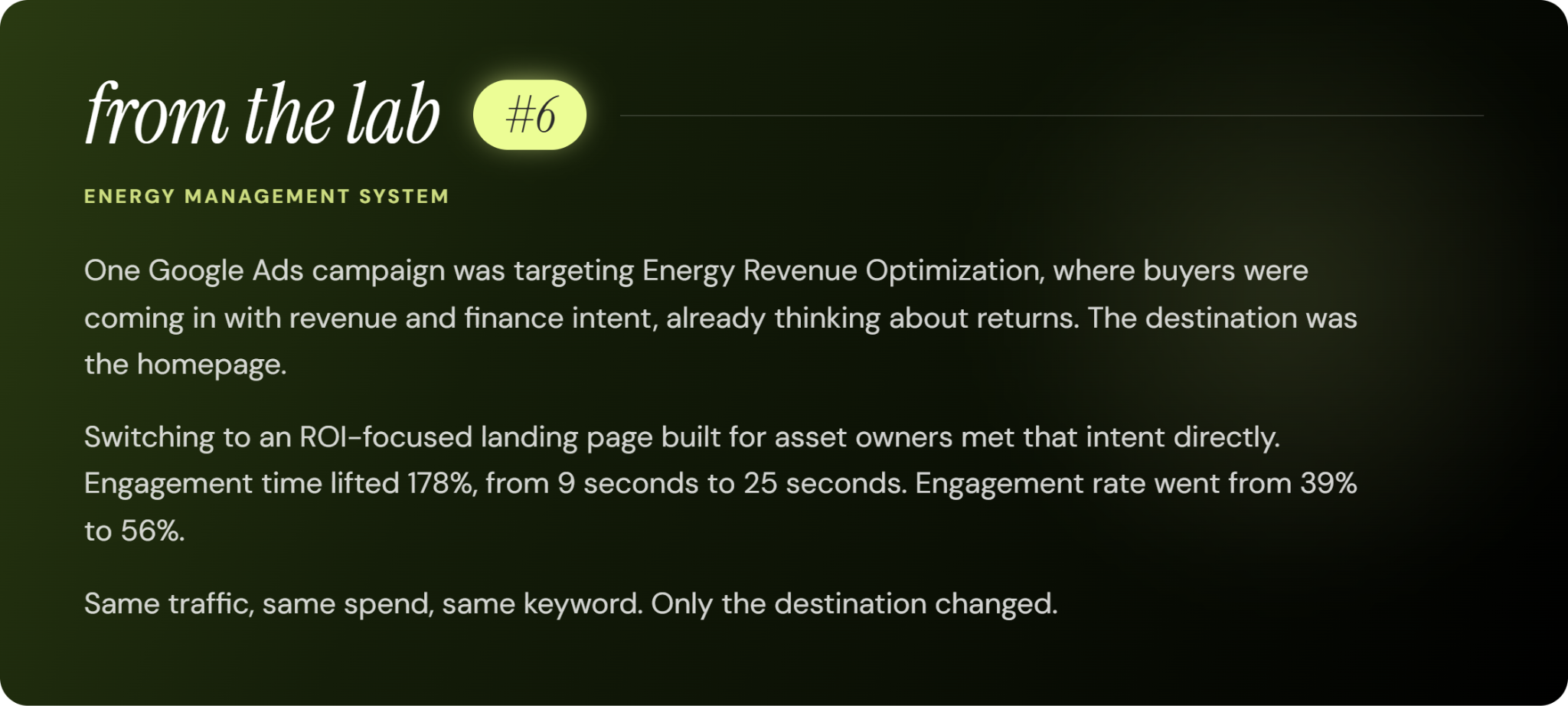
1) Landing Page
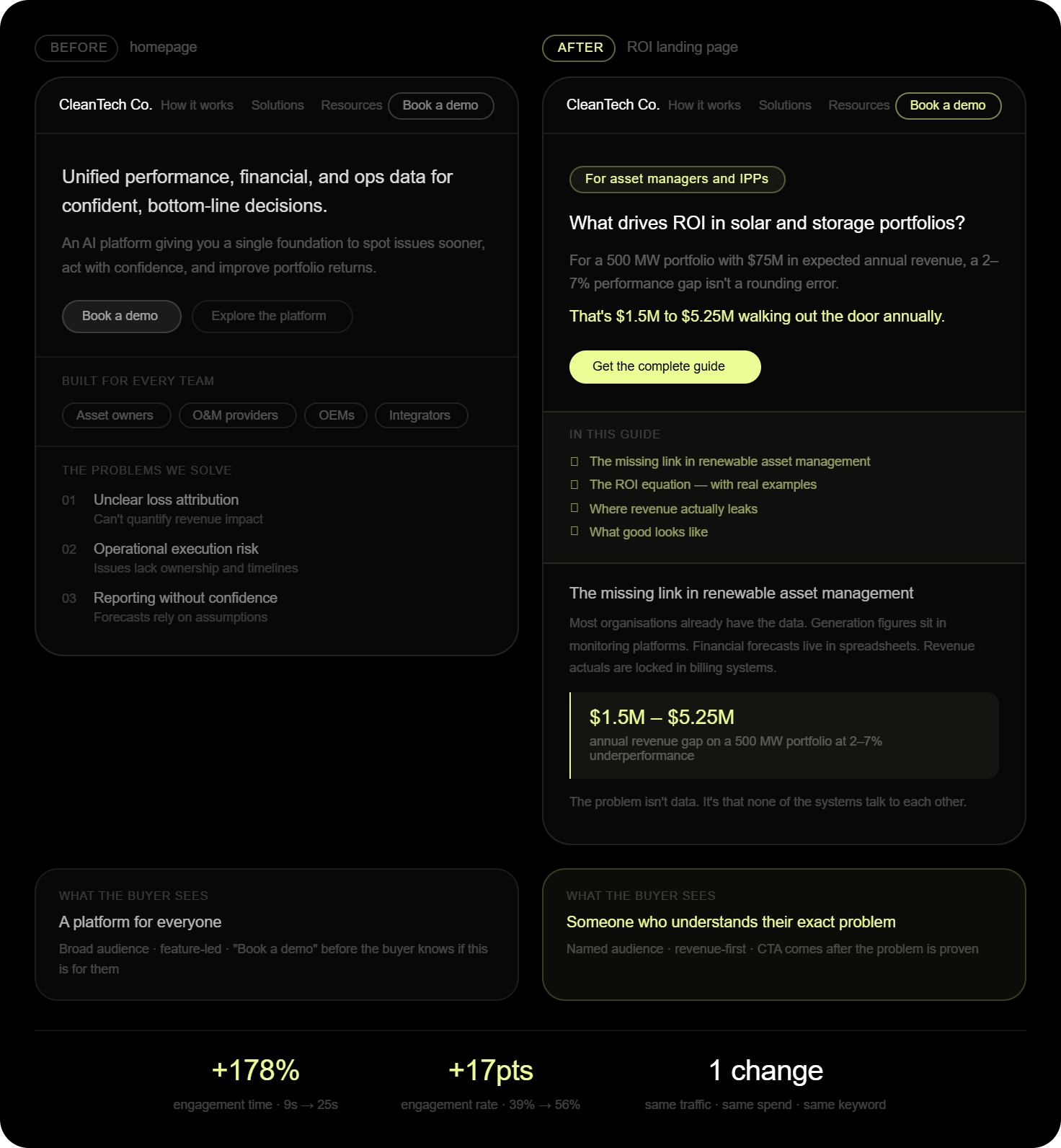
Landing pages are where a lot of search campaigns lose the conversions they already paid for.
A qualified buyer clicks a high-intent ad, hits a generic homepage, and leaves. Nothing went wrong with the keyword or the targeting, the problem was where you sent them.
To fix it, take each intent cluster, management, monitoring, ROI, pricing, and send it to a page built for that exact search rather than the homepage.
2) Day Parting
Day-parting gives marketers control over what time of the day their ads run.
LinkedIn CPMs stay high no matter when your ads run, since the platform doesn't discount overnight or weekend delivery.
This is why it doesn’t make sense to have a campaign burning budget at 2 a.m. on a Sunday, paying peak rates to reach an audience that isn't even working.
Pull your delivery by hour and day, find the windows where spend is high and engagement is low, and shut them off.
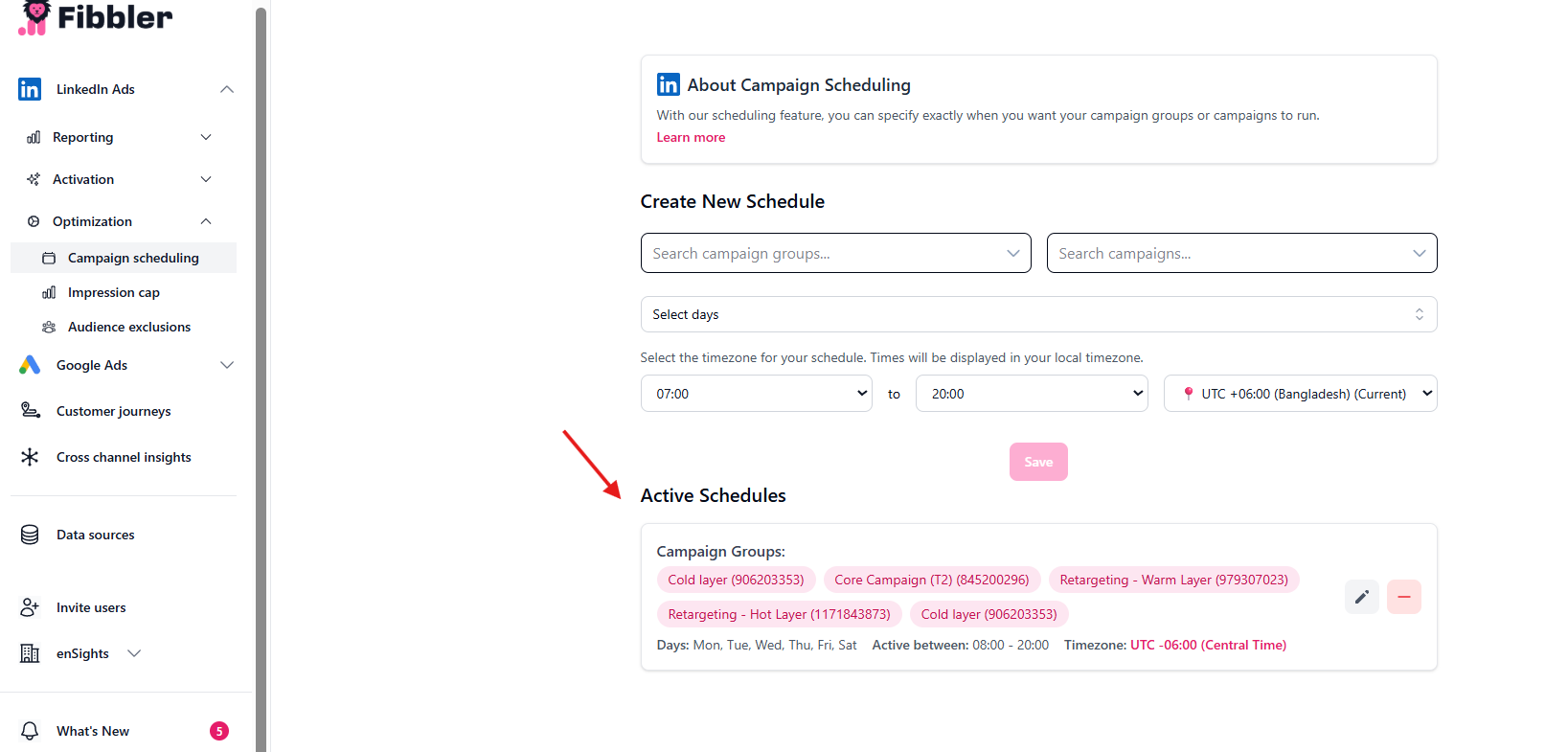
In most B2B accounts, limiting delivery to business hours Monday through Saturday recovers 15 to 20% of the monthly budget. You gain more during the hours when decisions actually get made.
3) Demographic segmentation
Demographic segmentation on LinkedIn is the fastest way to build exclusion data in any account.
Campaign Manager breaks your impressions, clicks, and conversions down by industry, job function, seniority, and company size. Pull the segment report, look for any breakdown that's eating 5% or more of your impressions while converting at more than 20% below the campaign average, and exclude it. The same logic applies to competitors if employee impressions from rival companies are showing up in your segment data without converting, exclude them. You're not trying to reach people who already have a solution.
Do this every month. The exclusion list keeps growing, and the targeting gets sharper each time without spending an extra cent.
The Changelog: Reinforcement Learning for Paid Media
The changelog is institutional memory. Without it, every quarter starts from zero.
Every optimisation across the accounts above lives in a structured log: date, action, channel, status, result.
When a board member asks why the LinkedIn budget shifted in Q2, the answer is a timestamped entry. When a Series B investor asks how the paid motion scales, the answer is 60+ logged experiments with their outcomes attached.
Over time, the log stops being a list of what you did and becomes a record of learning, showing exactly how performance improved and where growth came from.
The Growth Changelog we run for our clients is built across three layers.
Layer 1 - The Weekly Pulse
Search terms reviewed, bids adjusted, spend redirected toward what's working. Growth Dashes - two to four micro-optimisations a week, keep the account clean and responsive. This is the live signal layer.
Layer 2 - The Monthly Review
Every month you zoom out. Is each channel producing leads at a cost that makes sense? Does the budget need to move? Growth Sprints - structural tests running four weeks or longer, each scored on Impact, Confidence, and Ease get evaluated here. The ICE score keeps the team focused on what matters over what's easy.
Layer 3 - The Impact File
Every few months, everything logged across Layer 1 and Layer 2 rolls up into the Impact File - the cumulative scorecard. What changed, why it changed, what it moved, and what that means for budget efficiency, clicks, and cost of acquisition. The kind of document you put in front of a client to show them exactly how their budget has been working and how campaign-level efficiency connects all the way back to acquisition and revenue.
Each layer feeds the next. The pulse informs the review. The review builds the scorecard. And the scorecard is what turns a paid media program into something you can defend, scale, and keep improving.
The data you generate in the next 90 days is what you'll defend in the room.
Your leadership team, your board, your next funding conversation, and whoever's in that room all ask the same thing: how do you know this is working, and how do you scale it?
But now, you’re ready to answer. The stack produces the data, the changelog makes it defensible, and ninety days of structured testing with a clean account produces a predictive model.
Left alone, the targeting tax just keeps compounding. Every month the defaults stay on, the budget keeps reaching the wrong people and the changelog stays empty. The CAC number sits in your CRM with nothing behind it.
Do that for 18 months and you've spent 18 months of learning budget on activity that taught you nothing, and built a GTM motion you can't defend the moment someone asks it to scale.
Our GTM Diagnostic shows exactly where the tax is being collected across your accounts. In just 60 minutes, we review your domain, your current setup, and two competitors, then leave you with a prioritised list of structural fixes and a benchmark against comparable cleantech companies at your stage.
If you're ready to turn spend into a system, this is for you.
Get Your GTM Diagnostic Here→ Contact | CleanTech Growth Lab
Stay in the loop
Follow us on LinkedIn for more industry insights and resources to help increase your ROI.